SQL Tutorial Part 3: Table Grain
This is the first article to cover a conceptual framework that cannot be directly applied in SQL. However, it is an absolutely fundamental concept, so we will cover it now before moving onto working with multiple tables via joins. The concept is called Table Grain.
The grain of a table is the level of detail it contains within a single row, and it determines the most specific information that you can extract from the table. For example, a “Customer” table is likely to have a customer grain, meaning that there is one line per customer. That line may contain information such as the customer’s zip code, or the date their account was created. However, it probably does not contain the details of the customer’s order history because that would typically require multiple rows per customer (each customer is likely to have multiple orders). If you need order details, you would be better off using a table with order grain. I admit that this is a pretty confusing concept, so let’s look at an example:

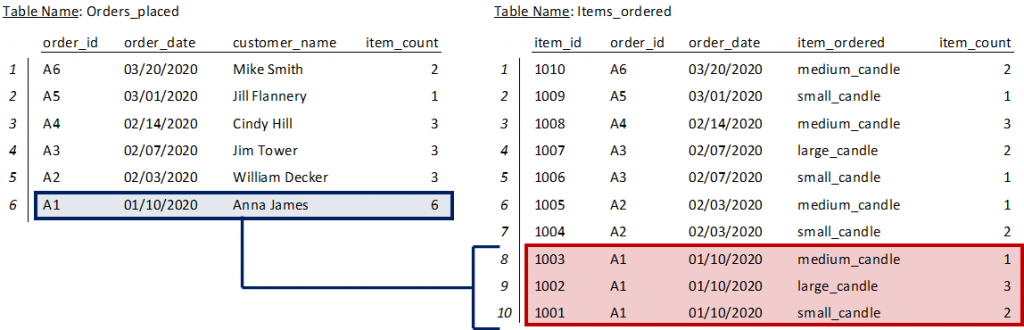
Per the tables below, both the blue and red highlighted rows are related to the same order, order A1. The order details are just shown at a different grain. You can verify that the order is the same by summing the item counts in the item_count columns of both tables (6 on the left vs 1 + 3 + 2 = 6 on the right).
That’s all for now on table grain. Just try to remember the general concept, because you will need to apply it when we move on to joins!
